Skip to content
Browse tools

DNS Propagation Checker

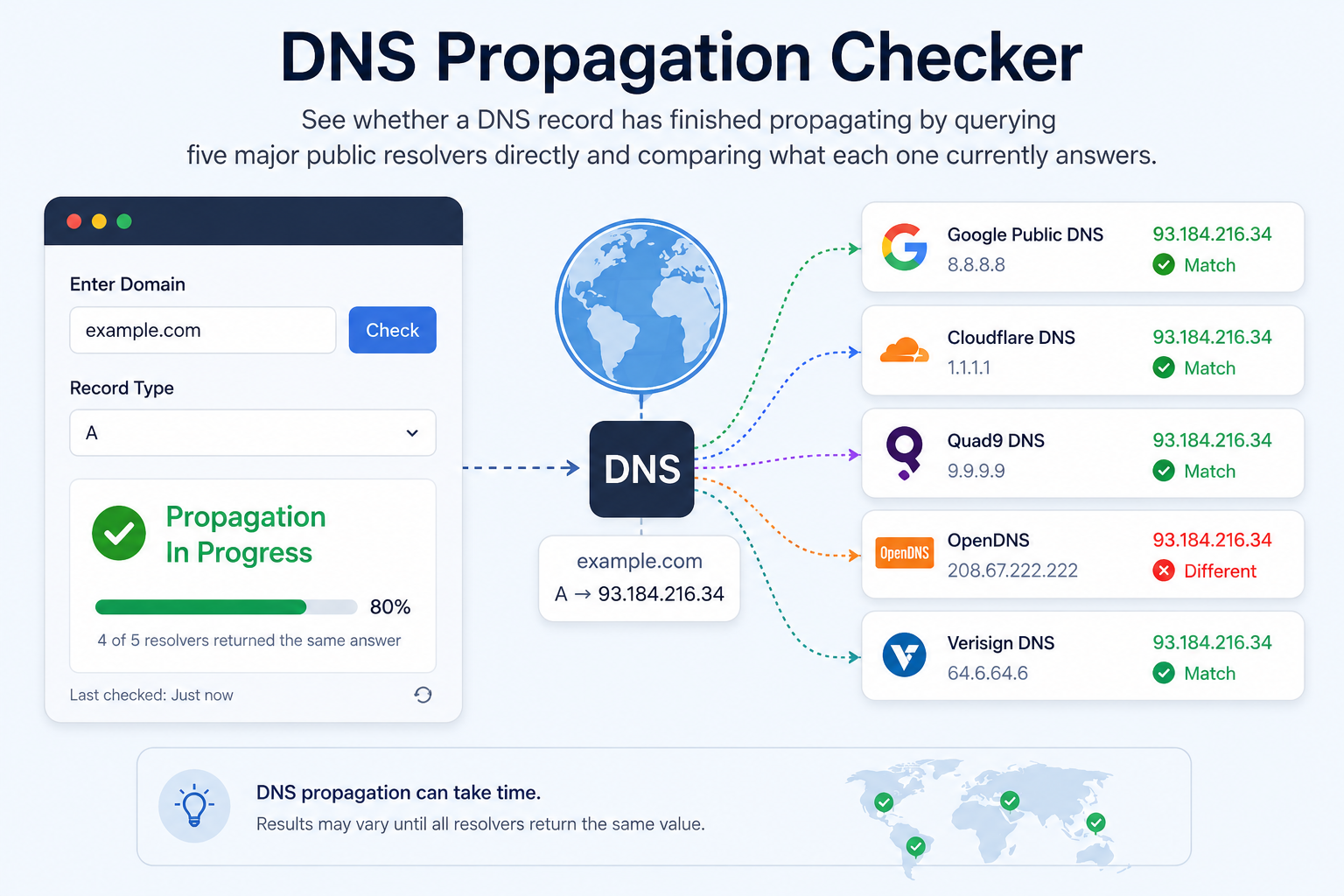
See whether a DNS record has finished propagating by querying five major public resolvers directly and comparing what each one currently answers.

Queries Google, Cloudflare, Quad9, AdGuard and OpenDNS independently over DNS-over-HTTPS. A record can look "fully propagated" and still take longer to reach an individual ISP's cache.
Enter a domain and pick a record type to compare what each public resolver currently answers.
0%
Not checked

Run a check to see the propagation status.

Resolvers Checked 0 public DNS resolvers queried
Matching Consensus 0 resolvers agree on the answer
Out Of Sync 0 resolvers with a different answer
Not Responding 0 resolvers that timed out or errored

📊 Per-Resolver Results

Sorted alphabetically by resolver - not by agreement, so a lone holdout is easy to spot.

Resolver Answer TTL Time Status

🔎 Findings

📋 Query Details

Domain
Record Type
Consensus Answer
Propagation
Checked At

📦 Raw API Result

DNS answers are cached per record's TTL by every resolver and every device between here and the visitor - a change can look "done" here and still take up to the old TTL's worth of time to reach everyone. There is no way to force it faster; the only lever is setting a shorter TTL before a planned change.
HOW IT WORKS

Five Independent Resolvers, Queried Directly

This checker does not rely on a single upstream API. It builds a real DNS query and sends it, over DNS-over-HTTPS (RFC 8484), straight to Google Public DNS, Cloudflare, Quad9, AdGuard and OpenDNS - five operators with entirely separate infrastructure and caches. Every resolver's answer, TTL and response time is shown on its own row, and resolvers are grouped by their exact answer set to work out the "consensus" - the most common answer across the panel right now. Propagation percentage is simply how many of the five currently match that consensus. A resolver that fails to answer is always reported as its own status rather than silently counted as agreeing or disagreeing.

What else can you check?

These tools all work on the same connection and address data — pick whichever question you actually have.

Want to see the full path to a site? DNS, redirects, every hop, the CDN, TLS and the origin server. Want to know your public IP? See your IPv4 and IPv6 addresses, location, ISP and ASN. Want to check your tower & route? Live ping, speed, DNS, traceroute and a map of nearby points. Want to ping from around the world? Real latency from real probes across 12 countries, live on a map. Want to locate any IP address? City, region, country and coordinates for any public IP. Want to know if an IP is risky? Proxy, VPN, Tor, hosting and abuse-report indicators. Want to know if you're blacklisted? Check an address against major spam and abuse DNSBLs. Want to know who owns an IP? Network owner, ASN, CIDR range and abuse contact. Want to explore an AS number? Announced prefixes, BGP neighbours and registry details. Want to test your connection speed? Measure real download, upload, ping and jitter. Want to see what changed? Word-level diff between two blocks of text or code. Want to verify a domain's nameservers? Direct authoritative checks, glue records and SOA serials. Want to check a domain's DNSSEC setup? DNSKEY, DS records, signature expiry and real validation. Want to see the hop-by-hop path to a server? A real traceroute from a genuine probe anywhere in the world. Want to know if a server port is open? A real TCP connection attempt - open, closed or filtered. Want to measure latency to a server? Real connect timing - min/avg/max, jitter and connection loss. Want a clean URL slug from a title? Real transliteration, stop words and batch mode. Want to find and replace across a document? Regex, capture groups and a live preview before you commit. Want to find the invisible character? Code points, escapes, bytes and hidden-character detection. Want to escape text for HTML? Minimal, named or numeric entities, attribute-safe. Want to strip emoji cleanly? Whole clusters - no half-flags or stray modifiers left. Want to spot repeated words? Frequency, density and accidental doubles like "the the". Want to know if a URL is cached? Two requests prove whether your CDN is really caching it. Want to see what a site knows about you? Storage, cookies, tokens and what your browser actually cached. Want to run that check on any site? One-click bookmarklet reads storage and tokens where they live. Want to know who your site talks to? Renders the page and names every outside company it contacts. Is your site one address or four? www, non-www, http and https - which serve, which redirect. Want to tidy up a messy SQL query? Beautify, minify, lint and convert keyword casing for six dialects. Need to work out a percentage? Nine calculators covering every way a percentage gets asked. Want to work out a rise or a raise? Increases, growth, compounding and CAGR, with the working shown. Want to work out a discount or a drop? Discounts, stacked sales and depreciation, with the working shown. What is actually on that page? Words, reading time, readability, every image, embed and link. Need a favicon that works everywhere? Every size, a real multi-resolution .ico, and the tags to paste.
COMMON QUESTIONS

DNS Propagation Checker FAQ

Why do different resolvers show different answers?

Each resolver caches a record independently for as long as its TTL allows. Right after a DNS change, resolvers that cached the old value before the change won't see the new one until that cached entry expires - this is normal and expected, not a fault.

How long does DNS propagation actually take?

At most, the record's TTL (commonly anywhere from 5 minutes to 24 hours or more) plus a little slack. There is no separate global "propagation delay" beyond individual caches expiring - once every resolver's cached copy has expired, every resolver reflects the new value.

Can I speed up propagation?

Not after the fact. Lowering the TTL a day or two before a planned change means old cached answers expire faster once the change goes live - lowering it during or after the change doesn't help, since resolvers are still working off the previous (longer) TTL until their current cache entry expires.

Why does this check five resolvers and not fifty?

A handful of independent, reputable, high-traffic operators (Google, Cloudflare, Quad9, AdGuard, OpenDNS) gives a meaningful, honest read on propagation. A longer list padded with obscure or unreliable resolvers wouldn't make the result more accurate.

What does "Not Responding" mean?

That resolver's query timed out or returned an error - it is never counted as either matching or mismatching the consensus, since a resolver that didn't answer told us nothing either way.